Execution Dependencies
Execution dependencies determine when a rule executes its logic and subsequently triggers other rules to execute. They are the primary mechanism for controlling the flow of logic through your strategy, and understanding how they work is essential for building strategies that behave as intended.
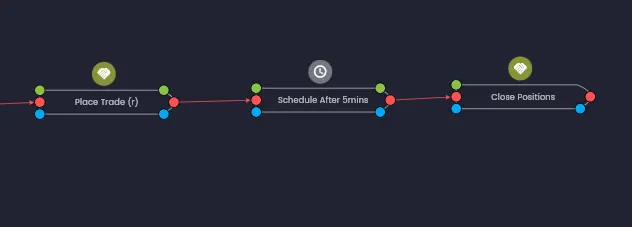
On the canvas, execution dependencies are represented by red solid lines connecting rules together. These lines show the execution flow — the order in which rules will fire when triggered by an external event.
Execution Input Ports
The red dot on the left-hand side of a rule is called the execution input port. If a rule has an execution input port, it must have an execution statement defined in the Execution Dependencies tab of the rule configuration in order to execute.
An execution statement is either an After or Every statement, which tells the rule when to fire based on the execution of other rules. Execution dependencies can also include Condition statements using the If option, which add logical checks that must be satisfied before the rule will execute.
You can quickly identify rules that are not configured to execute by looking for rules that do not have a red execution link connecting to their execution input port. Use the show/hide links toggle button in the canvas toolbar to help find these orphaned rules.
Rules Without Execution Ports
Some rules do not have an execution input port because they are triggered by external events rather than by other rules in the strategy. These include:
- Data source rules — such as the Price Data rule, which is triggered by streaming market data.
- Trade event rules — such as the Trade Monitor rule, which is triggered by trade update events from the broker.
- State rules — such as the Account State rule, which is triggered by both price update events and trade update events.
These externally triggered rules serve as the starting points of execution chains in your strategy. Other rules connect to them via execution dependencies to form the downstream logic.
The After Statement
An After statement does exactly what you would expect: the target rule will execute immediately after the referenced rule has successfully executed.
For example, configuring a Place Trade rule with AFTER 3 Green Candles means the Place Trade
rule will execute after the 3 Green Candles logic rule has executed.
Multiple After Statements
When an After statement is used in an execution dependency expression with multiple statements, the referenced rule only needs to have executed once for that statement to be satisfied.
Consider this example with two After statements:
AFTER 3 Green CandlesAND AFTER 3 Candles > 4 Pips
Each condition only needs to have been satisfied once for the Place Trade rule to trigger. This means:
- If the "3 Green Candles" rule executes but the "3 Candles > 4 Pips" rule does not, the Place Trade rule will not execute yet.
- If the next candle event triggers "3 Candles > 4 Pips" but not "3 Green Candles", the Place Trade rule will now execute — because both After statements have now been satisfied at least once, even though they were not triggered by the same candle event.
- Once both After statements have been satisfied, if either dependency rule executes again on a subsequent event, the Place Trade rule will execute again.
Key concept: Each statement in an execution dependency expression should be viewed as an independent event, regardless of the time the event occurred. An After statement remains satisfied once the referenced rule has executed, even if it was triggered by a different event to the other statements in the expression.
Synchronising Execution Statements
When you want to ensure that all execution dependency statements are satisfied at the same time — for example, both triggered by the same candle event — there are two approaches:
Logical Chaining
Sequence your rules in a chain using execution dependencies, where each rule triggers the next. This ensures a clear, ordered progression of logic in a serial execution path. Because each rule in the chain only executes when the previous rule fires, the entire chain is inherently synchronised to the same triggering event.
The Synchronise Feature
When synchronisation is enabled, an additional check is performed to ensure all statements in the execution dependency expression have been met within a defined time window from the latest triggering rule's execution.
For instance, if the "3 Green Candles" condition is triggered, then "3 Candles > 4 Pips" must also be triggered within one second for the expression to be satisfied. In practice, this would only happen if both conditions are triggered by the same candle data event.
The Every Statement
The Every statement operates in exactly the same way as the After statement when used as a single execution dependency. The key distinction appears when it is used in an expression with multiple statements.
An Every statement requires the referenced rule to execute each time the target rule is to be executed. Unlike the After statement, which remains true once the dependency rule has executed, the Every option is reset to false after the target rule executes. It requires at least one additional execution of the dependency for the expression to evaluate to true again.
Example
Consider the same two-statement expression using Every instead of After:
EVERY 3 Green CandlesAND EVERY 3 Candles > 4 Pips
If both the "3 Green Candles" rule and the "3 Candles > 4 Pips" rule have each executed once, the Place Trade rule will fire. After it fires, both Every statements reset. Both dependency rules must now execute at least one more time before the Place Trade rule can fire again.
If the "3 Green Candles" rule executes three more times before the "3 Candles > 4 Pips" rule executes again, the Place Trade rule will fire once when "3 Candles > 4 Pips" finally executes — then both statements reset and both dependencies need to execute again.
As with the After statement, using the Every option will still require rules to be synchronised or chained if you need to ensure they are triggered by the same event.
After vs Every Comparison
| Behaviour | After | Every |
|---|---|---|
| Single statement | Identical behaviour | Identical behaviour |
| Stays satisfied after execution | Yes — remains true once triggered | No — resets to false after target rule executes |
| Re-triggering | Any single dependency executing again triggers the target | All dependencies must execute again before the target fires |
| Best for | One-time setup conditions, initial state checks | Recurring conditions that must be re-evaluated each time |
Condition Statements (If)
A Condition statement lets you use standard logical operators to compare a rule's output data to output data from another rule, or to a value that you enter directly. Conditions can be grouped with parentheses to construct complex logical expressions.
Condition statements alone do not trigger rule execution. They must be used in conjunction with an
execution statement (AFTER or EVERY) for the rule to execute. The execution
statement determines when the rule can fire; the condition statement determines whether
it should.
Comparing Rule Output Data
The most common use of conditions is to compare the output data of two rules. For example, in the first strategy tutorial, the Place Trade rule uses a condition to check whether the SMA20 moving average value is greater than the SMA50 moving average value:
AFTER SMA20AND IF SMA20 → Moving Average > SMA50 → Moving Average
This reads: execute after SMA20, but only if the SMA20 value is greater than the SMA50 value.
Using Strategy State Data
Condition statements can also compare rule data to Strategy State data. Strategy State provides access to a variety of strategy-level information such as open profit, number of open positions, account balance and more.
For example, you can use the Has Open Positions field from Strategy State to ensure you only place a trade if there are no other positions open — effectively limiting the strategy to manage one trade at a time:
AFTER SMA20AND IF SMA20 → Moving Average > SMA50 → Moving AverageAND IF Strategy State → Has Open Positions = false
Execution Order
When an external event (such as a new candle or a trade update) triggers execution, the rules engine traverses the execution paths in your strategy following a fundamental principle: breadth before depth.
This means that all the immediate rule dependencies of a parent rule will execute before any of their children or descendants execute. This pattern repeats at each level of the execution chain.
Visualising Execution Order
The execution order is displayed next to the execution output port of each downstream rule when you select a rule on the canvas. A red lightning bolt icon with a number shows the execution priority of each rule relative to the selected rule. This provides a simple visualisation to identify the relative execution order of rules that are triggered by the same external event but are in different execution paths.
For example, selecting the XAUUSD 4h Price Data rule in the first strategy tutorial shows the full execution chain: SMA20 (1) → SMA50 (2) → Place Trade (3) → Close Positions (4) → Stop Loss (5).
Watch out for longer rule chains feeding data into shorter rule chains, where both execution paths are triggered by the same external data event or time schedule. The rule receiving data input from the longer chain will execute on data that is out of date unless you restructure the strategy design. The execution order visualisation will help you identify these types of issues.
Enabled and Disabled After Execution
As a safeguard, trading rules (such as Place Trade) are disabled after a single execution by default. This prevents repeated triggering of trading actions unintentionally — for example, placing multiple trades each time the execution dependency is satisfied.
You can update this behaviour using the Enabled switch in the Enable, Disable and Reset tab of the rule configuration. Enabling the rule after execution allows it to fire again the next time its execution dependencies are satisfied.
For more details on controlling rule state, see the Enable, Disable and Reset documentation.
Was this helpful? Let us know