Enable, Disable and Reset
A rule can only execute if it is enabled. The Enable, Disable and Reset functions give you dynamic control over which rules are active at any point during strategy execution. This allows you to build strategies that move through phases, reduce noise from rules that are no longer needed, and reinitialise logic when conditions change.
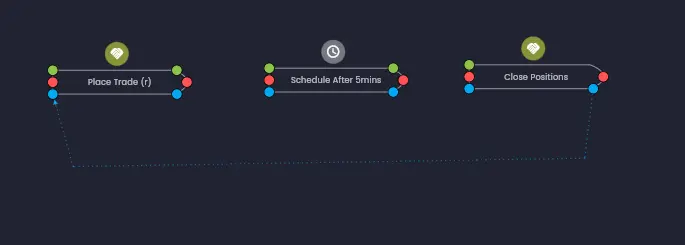
On the canvas, Enable, Disable and Reset relationships are represented by blue dotted lines connecting the controlling rule to the target rule.
How Enable and Disable Work
Any rule that can be executed has the ability to control the execution state of other rules after it has executed. This is configured in the After Execution section when editing a rule.
Disabling a rule effectively prevents it from executing in the future until another rule re-enables it or it is reset. This is useful for:
- Reducing noise — stopping rules from executing once they are no longer relevant, such as entry rules after a position has been opened.
- Phase-based strategies — transitioning between different stages of a strategy by enabling the next phase's rules and disabling the previous phase's rules.
- Preventing unintended repeated execution — trade rules are disabled after execution by default to avoid placing multiple trades unintentionally.
Example
Consider a strategy where a Cancel Sell Orders rule needs to re-enable a Place Buy Limit Orders rule after it executes:
- Edit the Cancel Sell Orders rule.
- In the After Execution section, configure it to Enable the Place Buy Limit Orders rule.
- Save the rule. A blue dotted line will appear on the canvas linking the Cancel Sell Orders rule to the Place Buy Limit Orders rule.
The result is that once the Cancel Sell Orders rule executes, the Place Buy Limit Orders rule becomes enabled again. On the next triggering event (such as a price tick), the Place Buy Limit Orders rule will be able to execute. Remember that trade rules are disabled after execution by default, so this pattern is commonly used to re-arm trade entry rules after an exit or cancellation.
Like other rule links, Enable, Disable and Reset links can be shown or hidden for clarity — either for an individual rule or for all links in the strategy using the toggle button in the canvas toolbar.
The Reset Function
The Reset function provides the capability to return a rule to its original state when the strategy started. A reset clears three things:
- Internal data — the rule's computed output values and any accumulated state.
- Execution state — whether the rule is currently enabled or disabled, returning it to its initial configured state.
- Execution count — the count of how many times the rule has executed, resetting it to zero.
This is useful when you want a rule to start fresh — for example, when reinitialising a condition or repeating a trade setup after certain criteria are met.
Reset Overrides
The effects of resetting rule data and the execution count can be overridden independently by the target rule, depending on the use case.
Preventing Data Reset
You may want to reset the execution count while retaining the rule's data — for example, if you are using the execution count for conditional branching but the rule's calculated values are still valid. To prevent another rule from resetting a given rule's data, switch off this capability within the target rule's Initial State configuration.
Preventing Execution Count Reset
In the opposite scenario, you may want to reset a rule's data while keeping the execution count intact. To prevent the execution count from being reset, use the switch in the target rule's Execution Dependencies section.
A rule will always return to its original execution state (whether that is Enabled or Disabled) after a reset, regardless of any overrides. The overrides only control whether the data and execution count are cleared.
The Reset Rule
In addition to configuring individual rules to reset specific target rules, Arconomy provides a dedicated Reset rule that resets all rules in the strategy when it executes. This is useful for strategies that need a complete reinitialisation — for example, after a trade cycle completes and the strategy should start looking for a new entry from scratch.
The individual overrides configured on each rule still apply when the Reset rule fires. If a rule has been configured to prevent its data or execution count from being reset, those overrides will be respected even during a strategy-wide reset.
Common Patterns
Re-enabling Trade Rules After Exit
Since trade rules are disabled after execution by default, a common pattern is to have an exit rule (such as Close Positions or a Trade Monitor detecting a closed trade) re-enable the entry rule. This creates a repeating trade cycle:
- Entry rule places a trade and disables itself.
- Exit condition closes the trade.
- Exit rule enables the entry rule again.
- The strategy is now ready to enter a new trade when conditions are met.
Phase Transitions
For strategies with distinct phases (e.g. accumulation, breakout, profit-taking), you can use Enable and Disable to activate only the rules relevant to the current phase:
- Start with accumulation rules enabled and breakout rules disabled.
- When accumulation conditions are met, the triggering rule disables the accumulation rules and enables the breakout rules.
- When the breakout rules execute, they disable themselves and enable the profit-taking rules.
Full Strategy Reset
Use the Reset rule at the end of a trade cycle to return all rules to their initial state, allowing the strategy to begin a completely fresh evaluation. This is particularly useful when combined with iterative execution to ensure each iteration starts from a clean state.
Was this helpful? Let us know