Data Dependencies
A data dependency describes when the output data of one rule is used as the input data for another. Data dependencies are how information flows between rules in your strategy — price values, indicator calculations, trade identifiers and more are all passed from rule to rule through data connections.
On the canvas, data dependencies are represented by dashed green lines connecting the output data port of one rule to the input data port of another. Like execution links, you can toggle visibility to isolate just the data dependencies for a single rule, or show and hide data dependency links for all rules at once.
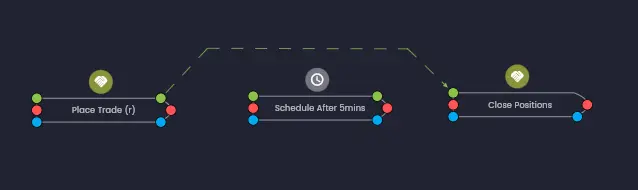
Data Ports
Each rule on the canvas can have two types of data ports:
- Output data port (green, right side) — appears on rules that produce data. This port publishes the rule's output fields, making them available to other rules.
- Input data port (green, left side) — appears on rules that consume data from other rules. This port receives data from the output port of the connected source rule.
A green dashed line drawn from an output port to an input port indicates that data is flowing between those two rules.
Input Data Sources
The Input Data section of a rule's configuration shows the sources of all data inputs for that rule. Input data can be sourced from several places:
- From Rule — output data from another rule in the strategy. This is the most common source and creates a data dependency link on the canvas.
- From Data Source — data from a data source rule such as Price Data. Data source rules are triggered by external events rather than execution dependencies, so they use a separate reference type.
- From Strategy Configuration — values defined in the strategy's configuration parameters, allowing the same strategy to be run with different settings.
- Manual entry — a value entered directly into the input field. This is useful for constants like fixed pip amounts or threshold values.
Output Data
To view all available output data from a given rule, navigate to the Output Data tab in the rule's configuration dialog. The output fields listed here are the values that other rules can reference as input data.
Output fields follow a strict typing format. This means that only outputs of compatible types can be used as inputs where those types are required. For example, a field that outputs a quote price can only be connected to an input that accepts a quote price — not a currency amount or a trade identifier. Common data types include quote prices, currency amounts, numbers and lists of trade identifiers.
If you need to convert between data types — for example, converting a number into a specific price or currency format — Arconomy provides dedicated conversion rules. See the conversion rules in the Rules Library for details.
Connecting Data Between Rules
To create a data dependency, open the target rule's configuration and set an input field to reference another rule's output. For example, to connect the candle close price from a Price Data rule to a Moving Average rule:
- Open the Moving Average rule's configuration.
- In the Source input field, change the dropdown to
from Data Source(since the Price Data rule is a data source). - Select the Price Data rule (e.g. XAUUSD 4h).
- Select the specific output field — for example, Ask Close.
Once saved, a green dashed line will appear on the canvas showing the data flowing from the Price Data rule to the Moving Average rule.
Seeding Historical Data
Some rules require more than just the most recent output data value to perform their calculations. For example, a Moving Average rule with a length of 13 needs a historical window of 13 data values — referred to as the lookback period — to compute a valid output.
All the necessary historical lookback data required from data source rules is fetched automatically before the strategy starts. This process is called seeding. It ensures that rules like the Moving Average can compute a valid output from their very first execution, rather than needing to wait for enough live data to accumulate.
Seeding is not performed on data sources configured for seconds or tick-level data, as the seed data required would likely be out of date by the time the strategy is deployed.
Data Dependencies Do Not Trigger Execution
A critical point to understand is that data dependencies do not implicitly trigger a rule to execute. A data connection tells a rule where to read its input values from — it does not cause that rule to fire.
Remember the simple principle: if a rule has a red execution input port but does not have a red execution link connected to it, the rule will not execute. Data dependencies (green lines) alone are not sufficient to trigger execution — you must also configure an execution dependency.
When Data Values Update
The rule that passes data to another rule does not have to be the same rule that triggers it to execute. However, you need to think carefully about when the data will be updated.
Output data values are updated for all rules that reference them when the rule that generates the data executes. This is particularly important in execution conditions that rely on current values — those values will reflect the most recent execution of the data source rule, not the time of execution of the rule that is using them.
To avoid stale data issues, the rule that generates the data should typically be positioned before the rules that need the data in the same execution path. This ensures the data is fresh when downstream rules consume it.
For example, in the first strategy tutorial, the Price Data rule triggers the execution of the Moving Average rules, which in turn trigger the Place Trade and Close Positions rules. This ensures the moving average values are always calculated from the latest price data before any trading decisions are made.
Use the execution order visualisation to verify that data-producing rules execute before data-consuming rules. Watch out for longer rule chains feeding data into shorter rule chains triggered by the same event — the shorter chain may execute on stale data.
Was this helpful? Let us know